
Project Overview
As a UX designer, my first project was to design a restaurant table-booking app that simplifies the process of making reservations for customers. The app allows users to browse and select available tables, view menus, and make payments seamlessly. To ensure a positive user experience, the app also includes features such as the ability to cancel or modify bookings, and real-time updates on table availability. Overall, the goal is to create an efficient and user-friendly platform that enhances the dining experience for both customers and restaurant staff.
Timeline
Feb 2023 - Apr 2023
My Role
Ux Designer
Platform
Figma
The Problem
One of the significant issues faced by restaurants is the inefficiency of their table booking process. Customers often have to wait in long queues or make multiple phone calls to reserve a table, leading to frustration and a negative experience.
Thus I worked on creating a simple and effective app that helps streamline the booking and reservation process for the users and makes it easy for restaurants and users to make a reservation.
Goal
The goal of this app is to have a streamlined and user-friendly solution to the table booking process, which can improve customer satisfaction and reduce the workload for restaurant staff.
Process

-
User Research
-
Competitive Audit
-
Market Analysis
-
Pain Points

-
Persona
-
Problem Statement

-
User Flow
-
User Stories
-
User Journey Map
-
Paper Wireframes

-
Lo-fi Prototype
-
Hi-fi Prototype

-
Usability Study
-
Hi-fi Prototype
Persona

User Journey Map

Paper Wireframes
The First step of my design was to create the paper wireframes based on the user flow determined in my earlier steps and after the paper wireframes, I moved to digital wireframes later on.

Digital Wireframes
After finishing my paper wireframes I moved on to FIGMA to create my Digital wireframes and while creating these wireframes I did some iterations to some elements and added a few more screens to my design


Usability Study
Introduction
-
Title: Creating a Table booking app for a Restaurant
-
Author: Anmolpreet Sidhu, Ux Designer anmolpreet9625@gmail.com
-
Stakeholders: Restaurant owners, XYZ - VP of design
-
Date: March 24, 2023
-
Project background: We are creating a Booking app for a restaurant so that it becomes easy for the customers to book and reserve their table in advance and to help them save time. Booking the table via walking in takes a long time and often results in losing customers and disappointment for the customers.
-
Research goals: Figuring out if the app will actually help save time or if people will still walk in for the table reservation on the spot.
Interview Questions
-
Open up the app and try to book a Table for a group of 4 people at 7:00 pm on 28th March 2023. Do your best to try to talk me through your process.
PROMPT 1 FOLLOW-UP: How easy and simple do you think booking and reserving the table was for a group?
-
What if I tell you to use the translate option in the app to change the language of the app would you be able to do that?
PROMPT 2 FOLLOW-UP: Could you please demonstrate?
PROMPT 2 FOLLOW-UP: How useful and easy do you think this feature is?
PROMPT 2 FOLLOW-UP: Would you like to add any suggestions for any new or to upgrade this feature?
-
Would you be able to take me to the Account Info page? If yes, Please demonstrate.
-
How would rate the app overall? What did you like and dislike about the app?
Key Performance Indicators (KPI)
-
Time on Task
-
Conversion Rate
-
User Error Rates
Methodology
-
Hallway Testing
-
Location: College Campuses, In Restaurants, Local Shops
-
Went to different locations and tested how well the users can easily use the app to book the table and will look for error rates and monitor the time it takes for a user to book a table and if a user is having trouble navigating. In the end a small SUS about how users felt while using the app.
Research Questions
-
How streamlined is the process of booking a table via the app?
-
How often are users engaging with Translate feature in-app?
-
In which step are users facing problems navigating to the next one?
-
Accuracy of tables available in real-time is accurate or not?
Participants
-
Local people in the neighborhood
-
College students with different backgrounds — to check for translating features.
-
Regular Customers of the Restaurant.
-
Incentive: Each user will be given a chance to win a raffle of $75 CAD.
Usability Study Findings

Time and Date
Users found it hard to change and select date and time

Translate Option
Users were having hard time to find the translate option
Design Iteraations
Design 1
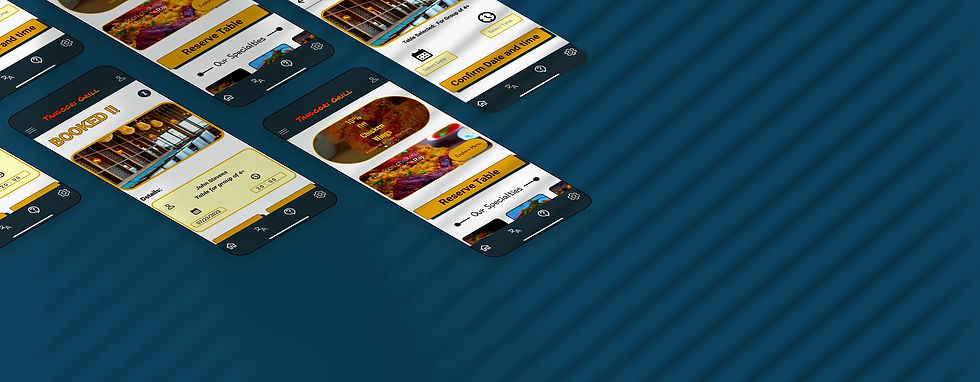
The earlier design was simple and had a menu option on its own. Later on in the final design I decided to add the quotes from the customers and have a Menu button inside the same group as the quote making it visually compelling and decided to remove the CALL TO BOOK TABLE as many users were not using the app to call the restaurant and added OUR SPECIALITIES instead.


Design 2
In 2nd usability study users were having trouble with selecting the date and time so I changed the way users select the time and date and added a 24-hour format and did some visual changes as well.


Changed the visual design of time overlay
Design 3
After doing the usability study and finding out that users were having trouble finding the Translate option. I went on and added the TRANSLATE Option in Hamburger Menu as well as Profile Menu




Takeaways
Impact
The app makes users feel like Tandoori Grill really thinks about how to meet their needs
What I learned
While designing the Tandoori Grill app, I learned that the first ideas for the app are only the beginning of the process. Usability studies and peer feedback influenced each iteration of the app’s designs.
Next Steps
-
Conduct another round of usability studies to validate whether the pain points users experienced have been effectively addressed.
-
Conduct more user research to determine any new areas of need.
